
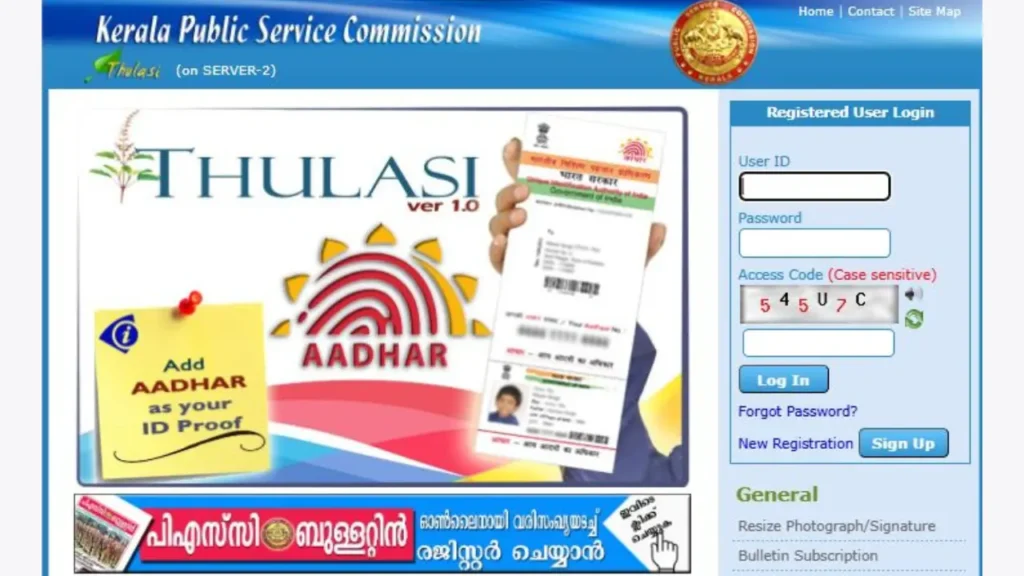
Kerala PSC Thulasi Login is an essential online service for candidates who are preparing for Kerala Public Service Commission (KPSC) exams. Through the PSC Thulasi portal, candidates can complete One Time Registration (OTR), log in to My Profile, apply for exams, download hall tickets, check results, and manage personal details.
Every year, lakhs of aspirants search for “Kerala PSC Thulasi Login”, “Thulasi Login My Profile”, and “PSC OTR Login”, making this one of the most searched government exam login topics in Kerala.
In this article, you will find a step-by-step guide to Kerala PSC Thulasi Login, solutions for forgot password, common login problems, and the official login link, all explained in a simple way.
Kerala PSC Thulasi Official Website – ലോഗിൻ ചെയ്യാൻ, മുകളിലുള്ള ബട്ടണിൽ ക്ലിക്കുചെയ്യുക.
Table of Contents
Official Links – Kerala PSC Thulasi
What is Kerala PSC Thulasi Login?
Kerala PSC Thulasi Login is the official online portal of the Kerala Public Service Commission that allows candidates to manage all PSC-related activities from a single dashboard.
Through the Thulasi portal, users can:
- Complete One Time Registration (OTR)
- Log in to PSC My Profile
- Apply for Kerala PSC notifications
- Download hall tickets
- Check exam results
- Update personal and educational details
The portal is mandatory for anyone applying for Kerala PSC government jobs.
How to Login Kerala PSC Thulasi – Step-by-Step
Step 1: Visit the Official Website
Go to the official Thulasi portal: https://thulasi.psc.kerala.gov.in
Step 2: Click on Login
On the homepage, click on the “Login” button.
Step 3: Enter Login Details
Fill in:
- User ID
- Password
- Captcha Code
Step 4: Click Login
After entering the details, click Login to access Kerala PSC Thulasi My Profile.
Once logged in, you can apply for exams, download hall tickets, and manage your PSC profile.
How to Login Kerala PSC Thulasi via Mobile
Kerala PSC Thulasi Login works smoothly on mobile browsers.
Steps:
- Open Chrome or any browser on your mobile
- Visit the official Thulasi website
- Enter User ID, Password, and Captcha
- Tap on Login
Tip: Use “Desktop Mode” in your browser if the page does not load properly on mobile.
How to Access Kerala PSC Thulasi My Profile
After successful login, candidates are redirected to My Profile, which is the control center of the PSC portal.
Services Available in My Profile
- View and edit personal details
- Apply for PSC notifications
- Upload photo and signature
- Download hall tickets
- Check application status
- View PSC exam results
Keeping your profile updated is very important, as incorrect details may lead to application rejection.
Kerala PSC Thulasi One Time Registration (OTR)
What is OTR?
One Time Registration (OTR) is a mandatory registration process for Kerala PSC candidates. Without OTR, you cannot apply for any PSC exam.
OTR Registration Steps
- Visit the official Thulasi website
- Click on “New Registration”
- Enter basic details (Name, DOB, Aadhaar, Mobile)
- Create User ID and Password
- Upload photo and signature
- Submit the registration
After completing OTR, you can use the same login details for all future PSC applications.
How to Recove Kerala PSC Thulasi Forgot Password
If you forget your Thulasi password, don’t worry. You can reset it easily.
Steps to Reset Password
- Go to the Thulasi login page
- Click on “Forgot Password”
- Enter User ID and Date of Birth
- Verify using OTP sent to registered mobile
- Set a new password
Make sure your mobile number is active to receive OTP.
Common Kerala PSC Thulasi Login Problems & Solutions
Thulasi Login Not Working
- Check internet connection
- Try again during non-peak hours
- Clear browser cache
Invalid User ID or Password
- Check Caps Lock
- Reset password using “Forgot Password”
OTP Not Received
- Check network signal
- Wait for 1–2 minutes
- Retry OTP request
Website Not Opening
- Use another browser
- Try desktop mode
- Visit during late night or early morning
How to Download Kerala PSC Thulasi Hall Ticket
Candidates can download hall tickets directly from My Profile.
Steps:
- Login to Thulasi portal
- Click on “Hall Ticket”
- Select exam
- Download and print
Without a hall ticket, entry to the exam hall is not allowed.
How to Check Kerala PSC Thulasi Result
PSC exam results are published through the Thulasi portal.
Steps:
- Login to Thulasi
- Click on “Results”
- Select exam name
- Download result PDF
Is Kerala PSC Thulasi Login Safe?
Yes, the Thulasi portal is fully secure and managed by Kerala PSC. However:
- Never share your password
- Avoid logging in from cyber cafes
- Always logout after use
Final Words
Kerala PSC Thulasi Login is the backbone of PSC recruitment in Kerala. Whether you are a first-time applicant or a regular PSC aspirant, keeping your Thulasi profile updated is extremely important.
By following the steps explained above, you can easily access PSC Thulasi Login, My Profile, OTR registration, Notification, hall ticket download, and result checking without confusion.
What is Kerala PSC Thulasi Login used for?
Kerala PSC Thulasi Login is used to apply for PSC exams, download hall tickets, check results, and manage PSC profile.
Is One Time Registration compulsory?
Yes, OTR is mandatory for all Kerala PSC candidates.
Can I login to Thulasi using mobile?
Yes, Thulasi login works on both mobile and desktop browsers.
What should I do if I forget my password?
Use the “Forgot Password” option on the login page to reset it.
Is there any PSC Thulasi mobile app?
No official app is available. Use the official website only.