
Updated step-by-step process, fees, key tips, common mistakes & why keeping Aadhaar updated matters
An essential part of your digital identity in India, your Aadhaar card is more than simply a government document. A valid and current Aadhaar card is becoming more and more important for everything from opening bank accounts and linking your PAN card to booking a SIM card, receiving government subsidies, and even applying for loans. However, what happens if your date of birth doesn’t match other documents, your name is spelled incorrectly, or your residence changes? Updating your Aadhaar can help with that.
In this blog, we’ll learn how to update your Aadhaar card online and offline, the latest rules and deadlines for 2026, fees, timelines, required documents, and some pro tips to help you avoid making any costly mistakes. Let’s get started.
Table of Contents
Why Updating Your Aadhaar Card Is Important in 2026
Your Aadhaar card number remains the same for life, but information such as your address, name, date of birth, gender, email, and mobile number can change – and UIDAI allows you to update these details. Keeping your information accurate offers the following benefits:
- Prevent issues with KYC for bank accounts, loans, and SIM connections
- Ensure you receive government subsidies and welfare benefits
- Avoid mismatches during identity verification
- Keep your Aadhaar compliant for official use
Even minor mistakes-such as misspelling a name or providing an outdated address-can lead to services or financial applications being rejected later on.
Big Update Alert: Free Online Aadhaar Update Till June 14, 2026
The UIDAI has extended the free online document updating service till 14 June 2026, which is great news for Indian Aadhaar cardholders. It means that you can correct important demographic information, such as your name or residence, for free if you update your Aadhaar online before this deadline.
This is an excellent opportunity to keep your Aadhaar updated; in short, it’s a deadline that might save you money and headache down in the future.
What You Can Update in Aadhaar
Aadhaar allows updating of the following details, depending on the mode you choose:
🔹 Online (myAadhaar / SSUP portal) – Address and certain demographic details with documents
🔹 Offline (Enrolment Centre) – Name, address, date of birth, gender, biometrics
🔹 By Post – Address and demographic update via postal submission
However, online updates require your mobile number to be registered with Aadhaar card, since OTP verification is mandatory.
1. Update Aadhaar Online (Simple steps)
This is the easiest way – if you only need to update your address or minor details.
Steps to Update Aadhaar Online
- Visit the official UIDAI portal:
https://myaadhaar.uidai.gov.in or SSUP portal. - Enter your 12-digit Aadhaar number and OTP sent to your registered mobile.
- Choose “Update Address” (or other update option).
- Enter the new details you want to update.
- Upload valid supporting documents as per requirements.
- Submit the request and note down the Update Request Number (URN/SRN) to track progress.
What Documents Are Accepted?
- Common Proofs of Address/Identity include:
- Passport
- Voter ID
- Ration Card
- Bank Statement or Passbook
- Electricity/Water bill (recent)
Always upload clear, colored, self-attested scans to avoid rejections.
Advantages of Online Update
- Can be done from home
- Fast processing (often 5–15 work days)
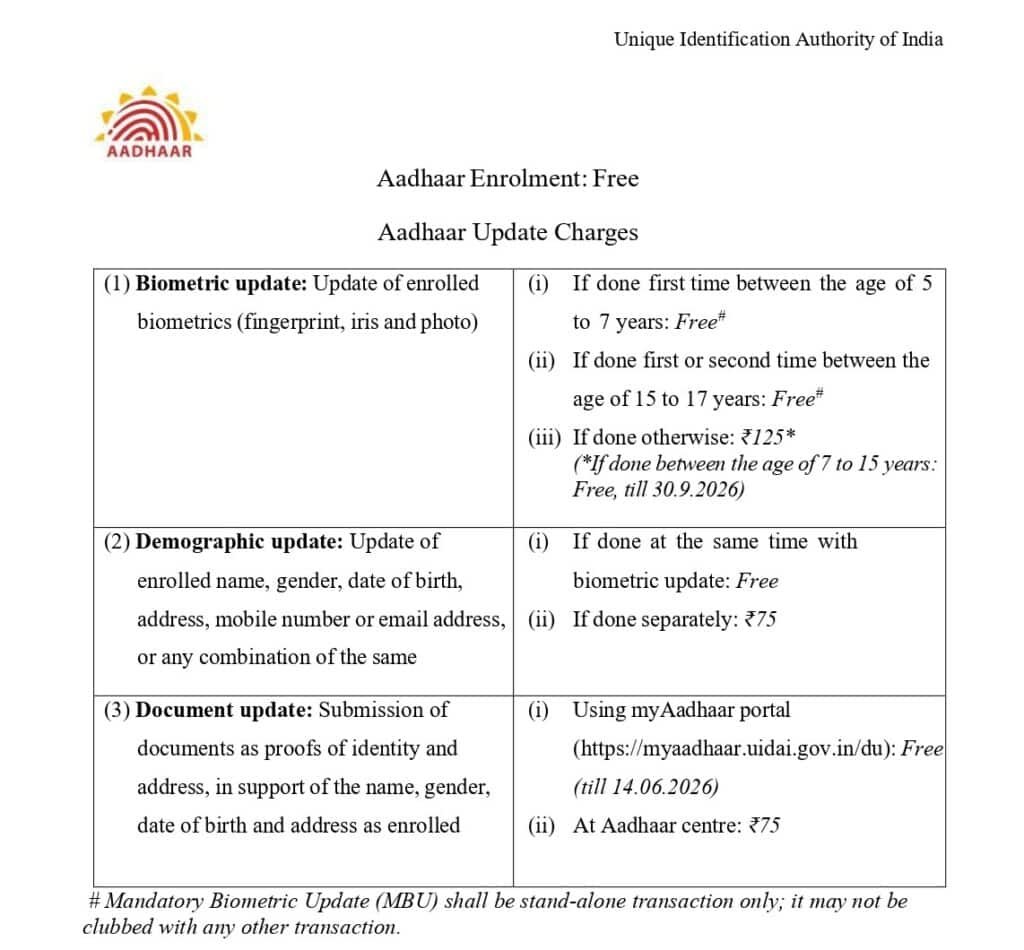
- Free until 14 June 2026 if document upload is done online Aadhar Card Download
2. Update Aadhaar card Offline (In-Person)
If you need to update essential details such as your name, date of birth, gender, or biometric information, or if the online method isn’t working for you, then the offline method is the right option.
Steps for Offline Update
- Find your nearest Aadhaar Enrolment Centre through the UIDAI site.
- Carry original supporting documents (they will be scanned).
- Fill the Aadhaar Update/Correction Form at the centre.
- Provide biometric authentication if required.
- Pay the applicable fee (usually ₹75 for demographic updates).
- Get your Acknowledgement Slip with URN to track status.
Update by Post (Alternative Offline Method)
If it’s difficult to go to a center:
- Download and print the Aadhaar Update Form from UIDAI.
- Fill in the details and attach self-attested copies of valid documents.
- Send it via postal service (address on UIDAI website).
- Make sure your mobile number is correct — it will be needed for the URN SMS.
3. Aadhaar Update Fees & Timeline
| Method | What You Can Update | Cost | Approx Processing Time |
|---|---|---|---|
| Online (myAadhaar) | Address & some demographics | Free till June 14, 2026 (₹75 after) | 5–15 days |
| Offline Enrolment Centre | All details incl. biometrics | ₹75 | 15–30 days |
| By Post | Address only | Free | 15–30 days |
After 14 June 2026, a standard fee of ₹75 will be charged for online document updates. Additionally, some recent reports suggest that facilitation charges at service centers may increase – so acting quickly could save you money.
How to Track Your Aadhaar Update
When you submit an update request, you receive a URN (Update Request Number) or SRN (Service Request Number). Use this number on the UIDAI tracking page (the portal you used to apply) to check the status of your request and see if it has been approved, is pending, or has been rejected.
Common Mistakes That Delay Aadhaar Updates
- Uploading unclear or mismatched documents
- Mobile number not linked to Aadhaar before starting the online process
- Using outdated proofs or formats that are not accepted
- Not saving the URN for tracking purposes
Tip: Make sure that the spelling of your name and your date of birth match those on other IDs such as your passport or PAN card — otherwise, verification often fails.
What Happens If Your Update Is Rejected?
Some users have reported confusion and frustration with Aadhaar update rejections — even after submitting valid documents. One such case involved a valid domicile certificate being rejected without clear reason, forcing the person to reapply and escalate via RTI. (Source-Reddit)
This highlights an important point: having the correct documents and paying attention to details is crucial. If your application is rejected, check the reason in your status update and correct any errors before reapplying.
Pro Tips to Update Aadhaar Easily
- Always keep your mobile number active and linked before you begin.
- Use high-resolution scans (PDF, PNG, or JPEG).
- Double-check the spelling, date format, and address details.
- Track your update using the URN.
- Apply before 14 June 2026, to avoid late fees.
Conclusion: Don’t Delay — Update Your Aadhaar Today
Your Aadhaar card is much more than just a document – it’s a gateway to services, identity verification, banking, and much more. With the free online update window open until 14 June 2026, there’s no better time to ensure your details are accurate and secure for the future.
Whether you choose the online portal for instant updates, visit an enrollment center for comprehensive assistance, or send your application by mail, this guide provides you with the clarity, confidence, and tools you need to take action now. Having the correct Aadhaar details not only eliminates hassles but also empowers you in India’s digital world.
How can I update Aadhaar online?
If your mobile number is linked, you can update your address and some demographic details online through the myAadhaar portal.
How long does it take for an Aadhaar card to be updated?
Most online updates are completed within 5-15 business days, while offline updates may take 15-30 days or even longer.
How much does it cost to update an Aadhaar card?
Free online Aadhaar document updates are available until June 14, 2026. After that, a fee may be charged.